Link Activity Log — Every Change, Every Editor, On Record
Every edit to a link is logged automatically — who changed it, what they changed, and the exact before/after values. Open the Activity tab on any link and the full history is there.
Last updated: June 2026
go.brand.com/campaignActivity tab
Alex L. · Edited routing rule
2m ago/en/lp-old → /en/lp-v2
Sara J. · Added tag "Q3 Campaign"
1h agoAlex L. · Added rule · Country: Germany
3h agoTarget: /de/lp
Sara J. · Changed destination URL
1d ago/en/old-lp → /en/new-lp
Without an activity log
Changes happen. You find out when something breaks.
Destination URL was changed — you don't know who did it or when
A routing rule stopped working — no way to see what it looked like before
Traffic dropped after a Friday edit — three people deny touching it
Post-campaign audit requires reconstructing changes from memory
With Revolink
Every change is on record. Finding the cause takes 30 seconds.
Every edit logged: author, action, exact timestamp
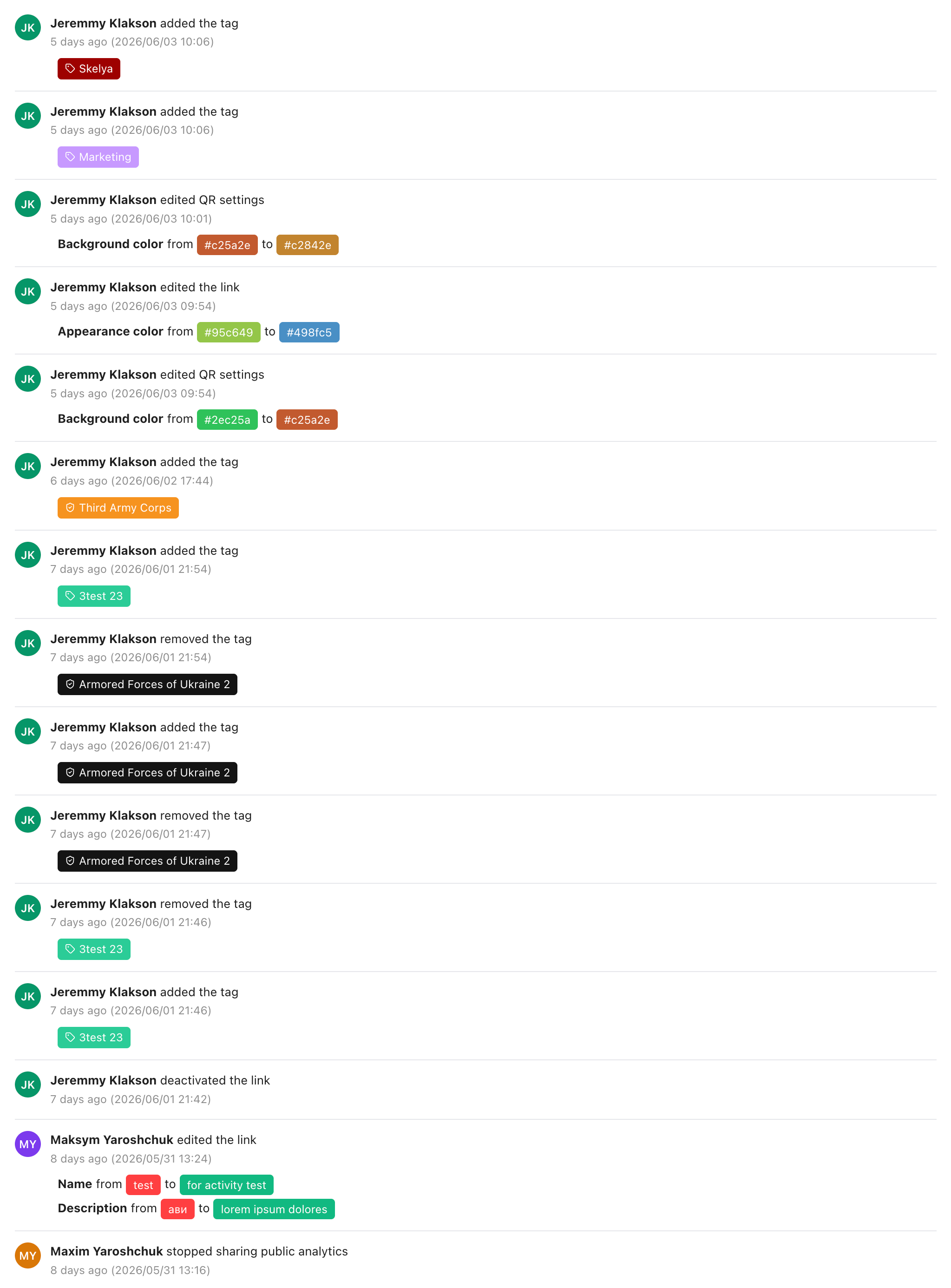
Before/after values shown for every field change — URL, color, name
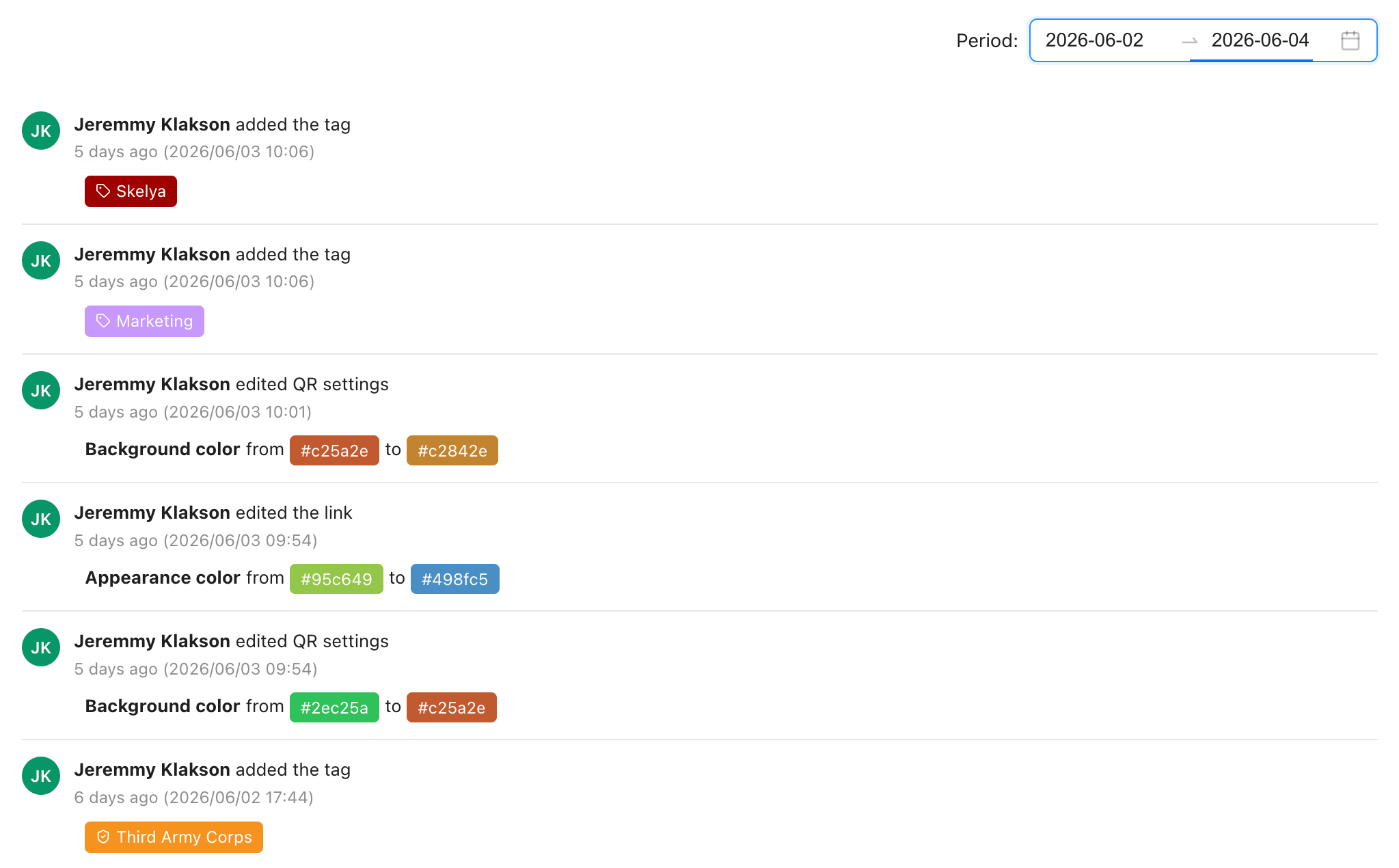
Filter by date to see exactly what happened during a campaign
Available on Free plan — no additional setup
How to read the activity log
No setup. It's been recording since your first link.
Open any link in your dashboard
InstantEvery Revolink link has an Activity tab. Click it on any link — the full change history is already there.
Read the reverse-chronological log
The newest entry is at the top. Each row shows: who made the change, what type of change it was, and the timestamp. For URL or field changes, the old value and new value are shown inline.
Filter by date range
90-day historyUse the date range picker in the top-right corner to scope the log to a specific period — the duration of a campaign, the day a traffic drop started, or a compliance window.
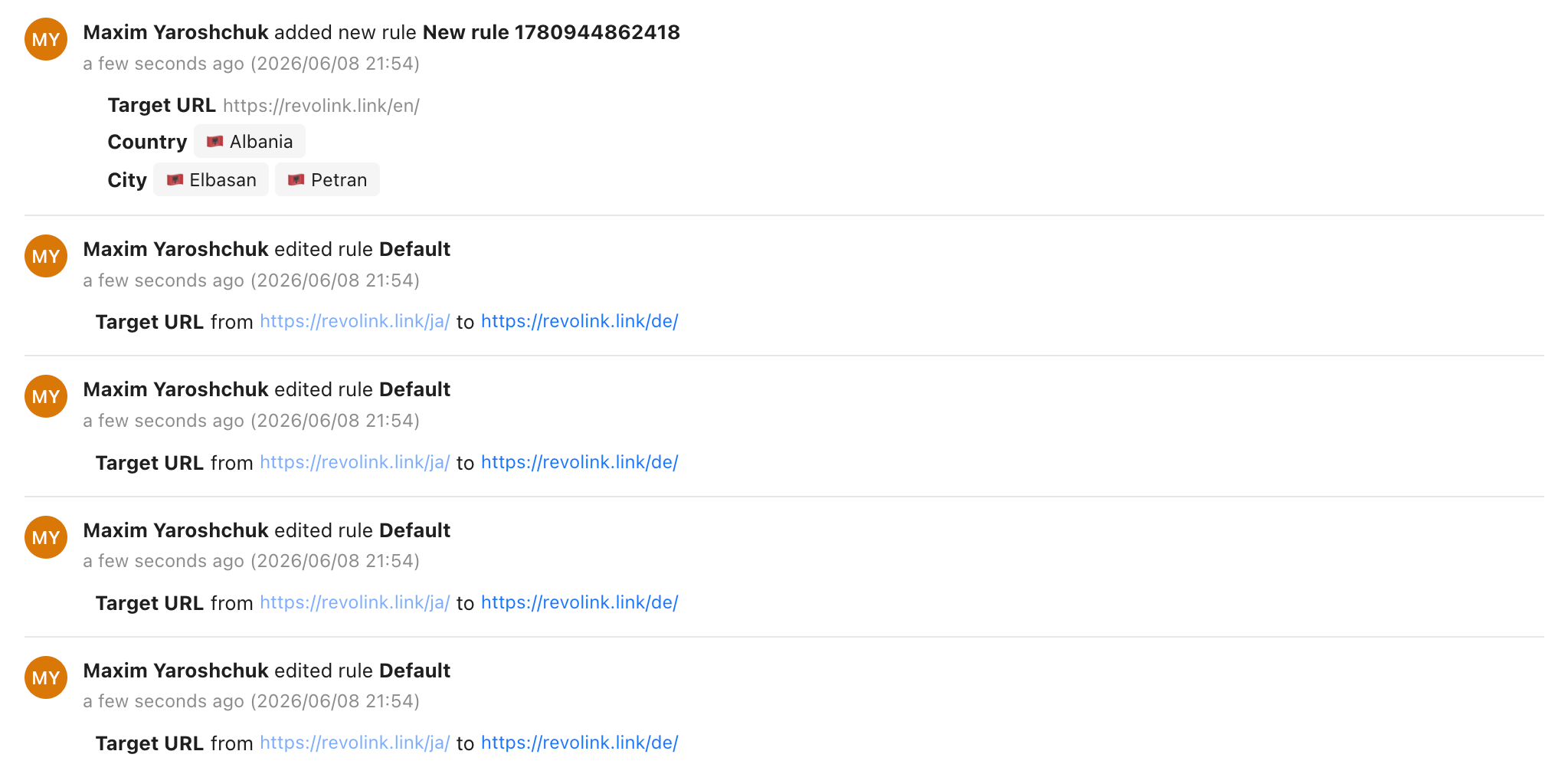
What it looks like in the dashboard
The Activity tab on any link — no setup, no extra tools.
When the activity log saves you
Three real situations where knowing what changed — and who changed it — matters.
Debugging a traffic drop
Geo routing stopped working after a team member edited a rule
Alex L. · Edited routing rule "Germany"
/de/lp → /en/lp
Sara J. · Changed destination URL
/en/promo → /en/sold-out
Open the Activity tab, find the rule edit — before/after values show exactly what broke and when
Campaign post-mortem
Q3 campaign ran for 6 weeks across 3 team members
Mike K. · Added A/B variant B (30%)
Weight 0 → 30%
Sara J. · Updated destination URL
/lp-v1 → /lp-v2
Filter to campaign dates → a clean timestamped record of every config change during the campaign
Team accountability
Destination URL changed 10 minutes before launch — no one knows who did it
Alex L. · Changed destination URL
/en/launch → /en/old-page
Alex L. · Enabled link
Disabled → Enabled
Activity log shows exactly who changed what and when — no guesswork, no conversation needed
90 days
Activity history, all plans
8
Types of changes tracked
Before + After
Values shown for every edit
0
Setup or code needed
Common questions
How far back does the link activity log go?
The activity log covers the last 90 days of changes per link, across all plans including Free. Entries older than 90 days are removed automatically.
What types of changes are tracked?
Eight types: destination URL changes, routing rule additions/edits/removals, A/B variant changes, link enabled or disabled, tag changes, appearance settings (QR, colors, branding), link metadata (name/description), and public analytics sharing toggled on or off.
Can I filter the activity log by date?
Yes. Use the date range picker in the top-right corner of the Activity tab. The log updates immediately to show only entries within the selected period — useful for post-campaign audits.
Does the log show what a value was before and after a change?
Yes. For field-level changes — destination URLs, rule target URLs, colors, names, descriptions — the log shows both the old value and the new value side by side. You don't need to guess what changed.
Is the link activity log available on the Free plan?
Yes. Link activity is available on all Revolink plans, including Free. Every change to every link is logged automatically — no setup required.
Can I restore a previous rule configuration from the activity log?
The log shows the exact before/after values for every rule edit, so you can manually recreate a previous state. One-click rule restore is not currently available, but the log gives you everything you need to do it manually.
Route Smarter. Convert More.
Stop sending everyone to the same page. Route by location, device, and time — free forever on the free plan, no credit card required.
Start for Free — No Card RequiredFree plan · No credit card · Cancel anytime