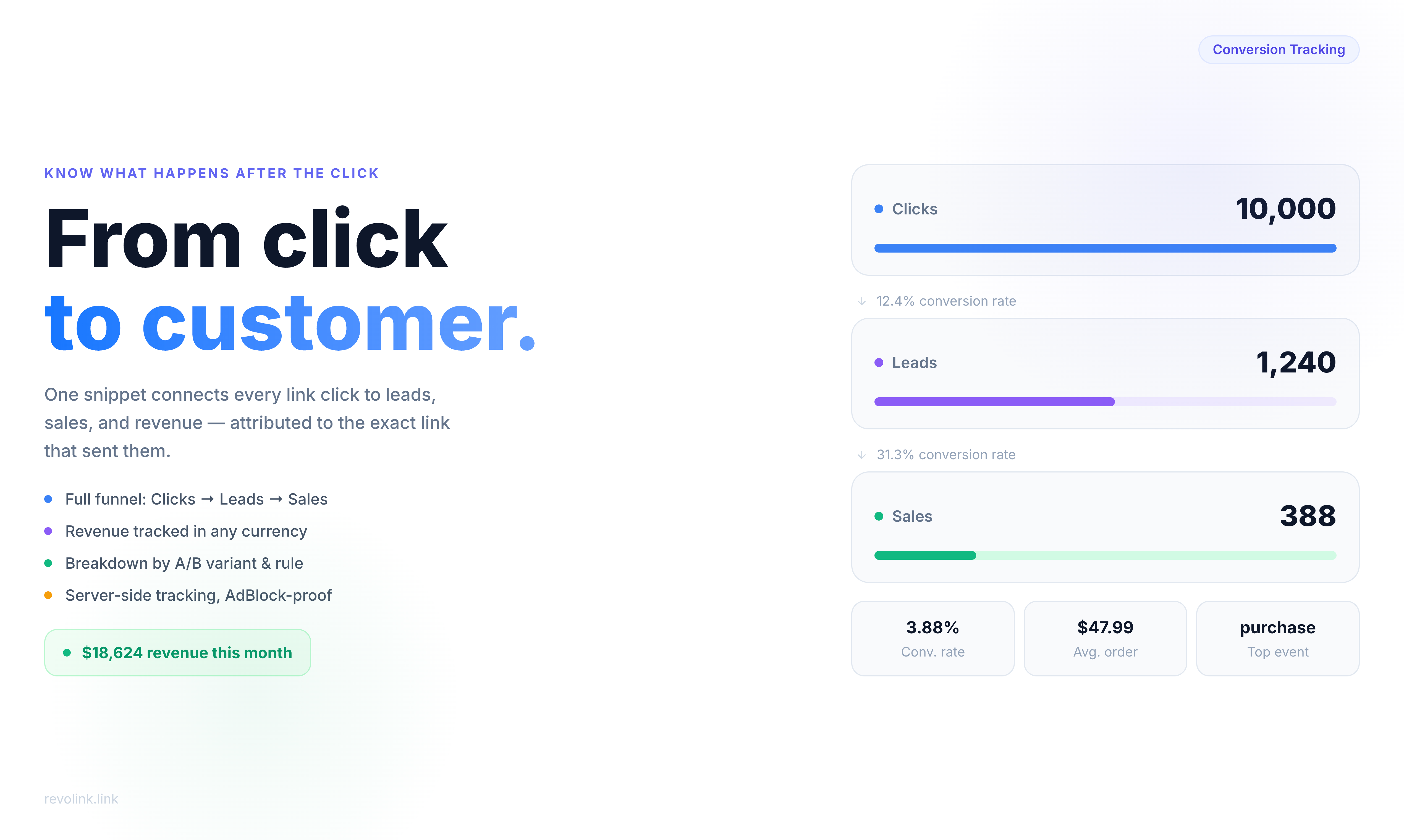
10,000 Clicks. Zero Sales. What Went Wrong?
You launched the campaign. You shared the link everywhere - newsletter, Instagram bio, paid ads, Slack communities. By the end of the week you had 10,000 clicks. Your team celebrated. Your boss asked the obvious question:
How many of those people actually bought something?
You didn't know. You had the click number. You had nothing else.
This is the gap that kills marketing budgets. Not bad campaigns - campaigns where you genuinely have no idea if they worked. Clicks look good in a dashboard. They feel like progress. But a click is just a moment of curiosity. What matters is what happened in the ten minutes after.
Revolink Conversions closes that gap. It connects the link click to everything that follows - leads, purchases, sign-ups, revenue - and shows you the full picture in one place.
The Attribution Black Hole
Here's how attribution usually breaks down:
You create a link. Someone clicks it. They land on your page. Maybe they buy, maybe they don't. Your link analytics shows the click. Your payment processor shows the purchase. But connecting those two events - proving that this specific click led to this specific sale - requires stitching together data from three different tools, none of which talk to each other.
Marketers solve this with UTM parameters, custom tracking pixels, spreadsheets, and a lot of educated guessing. It works, sort of. But it breaks every time someone uses a different browser, blocks cookies, or comes back three days later.
Conversion tracking in Revolink takes a different approach. The tracking starts the moment someone clicks your link, and stays attached through everything that happens on your site afterward. One snippet, end-to-end attribution.
The Funnel You've Always Wanted
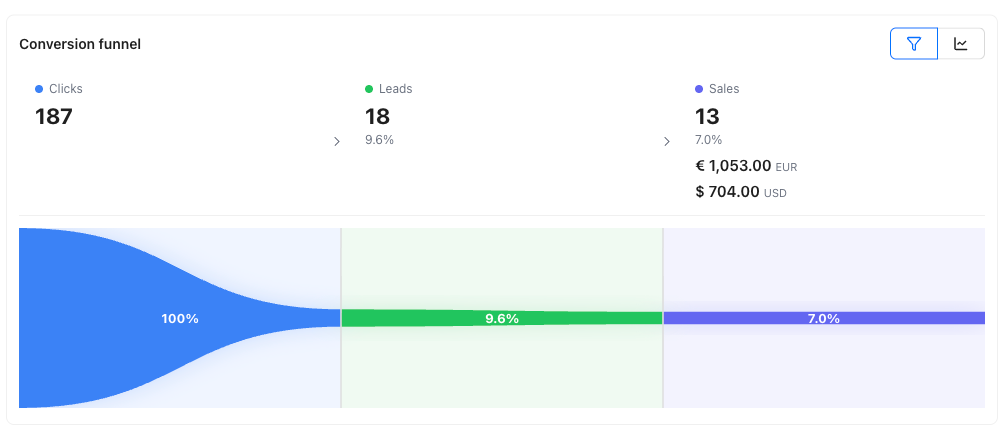
Every link you create in Revolink can show you a three-step funnel:
Clicks → Leads → Sales
Clicks you already know. Leads are moments of clear interest - someone filled out a form, started a checkout, signed up for a trial. Sales are closed deals: purchases, subscriptions, completed payments.
Next to each step you see the conversion rate. If 10,000 people clicked, 800 became leads, and 240 made a purchase - that's an 8% click-to-lead rate and a 30% lead-to-sale rate. Suddenly you know exactly where people are dropping off.
Is the landing page failing to convince? The click-to-lead rate will tell you. Is the checkout flow broken? The lead-to-sale rate will tell you. Is the whole funnel working but your ad targeting is off? The click volume with low lead rates will tell you.
The Events That Actually Matter
Conversion tracking isn't one-size-fits-all. Different businesses have different conversion moments. Revolink lets you track the ones that matter to you:
Lead - Someone expressed genuine interest. Form submission, content download, free trial start.
Purchase - A transaction completed. Works with any payment processor, any currency.
Subscribe - Newsletter signup, SaaS subscription start, membership activation.
Complete Registration - Account created, onboarding finished, profile set up.
Initiate Checkout - Cart opened, payment page visited. Useful for spotting drop-off before purchase.
You can also define your own. If your conversion moment is "watched demo video" or "booked a call" or "downloaded the app" - name it whatever makes sense for your funnel and track it.
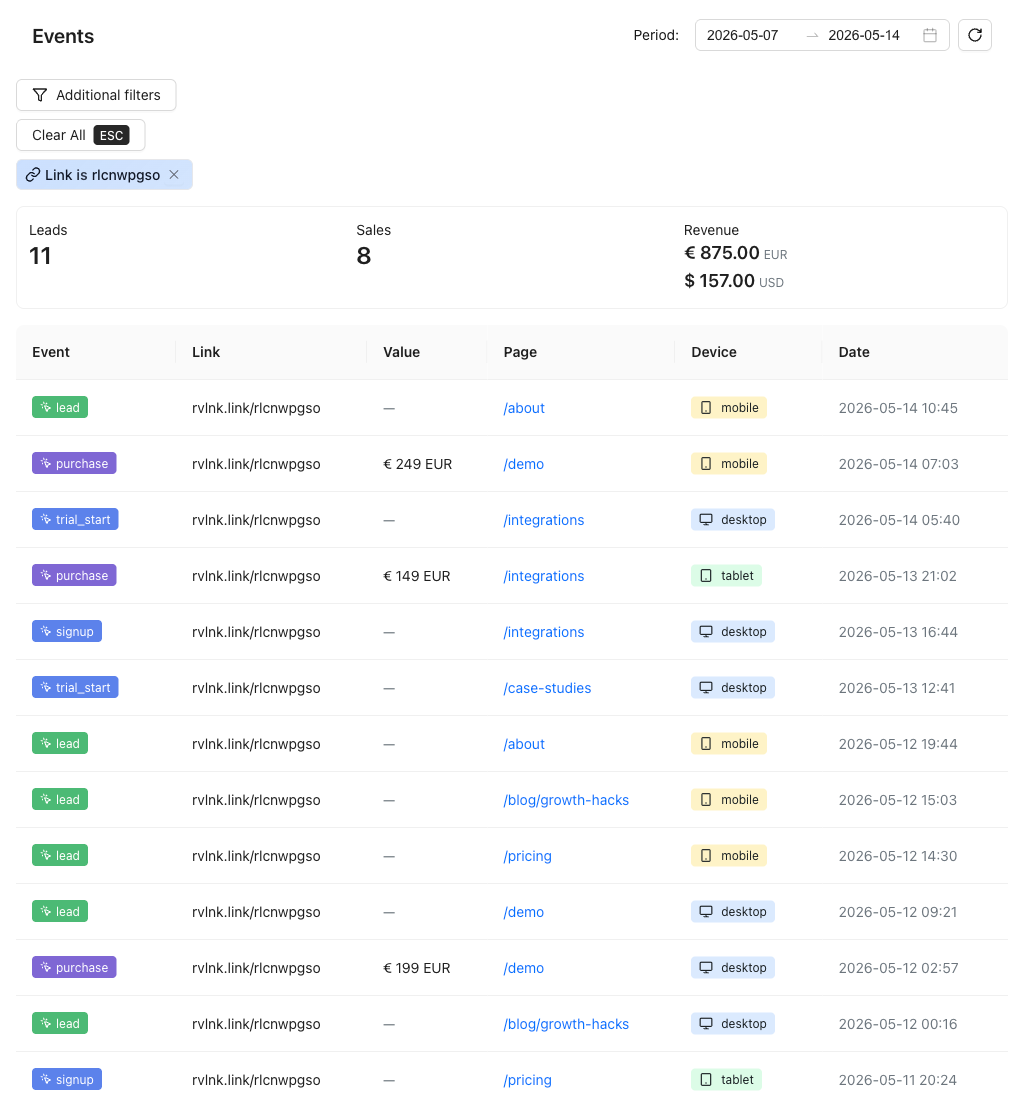
Every event shows you the device it came from (desktop, mobile, tablet), the page it happened on, and the exact timestamp. Filter by event type, by link, by date range. If something looks off in your funnel on a Tuesday afternoon, you can drill down to exactly what happened.
Revenue Is the Real Metric
Clicks are vanity. Revenue is sanity. That's not a new idea - but most marketing tools still make revenue tracking unnecessarily hard.
Revolink lets you attach a monetary value to any conversion event. When someone completes a purchase, you pass the transaction amount and currency. The platform aggregates that into total revenue per link, per campaign, per time period.
This means you can finally answer the question every CMO actually cares about: which link made us the most money?
Not which link got the most clicks. Not which post got the most engagement. Which specific piece of your marketing effort - which email, which ad, which influencer post - converted into actual revenue.
Multi-currency is supported natively. If you're running campaigns in EUR, USD, and GBP simultaneously, the revenue figures stay separated by currency. No forced conversion, no averaging that hides the truth.
A/B Testing Gets Smarter
If you've used Revolink's A/B testing, you already know how to split traffic between two landing pages. But traffic splits without conversion data are just click splits. Knowing that Variant A got 52% of clicks and Variant B got 48% doesn't tell you which variant you should keep.
Knowing that Variant A got more clicks but Variant B generated 40% more revenue - that tells you something.
When conversion tracking is active on a link running an A/B test, the funnel breaks down per variant. You see clicks, leads, and sales for each version side by side. The conversion rates make the decision obvious. You stop optimizing for clicks and start optimizing for outcomes.
The same logic applies to targeting rules. If you're routing mobile visitors to one page and desktop visitors to another, conversion tracking shows you whether that routing decision is actually paying off - not just whether people are clicking through, but whether they're converting after they arrive.
Setup in Three Minutes
The part most marketers dread: "you'll need your developer to install this."
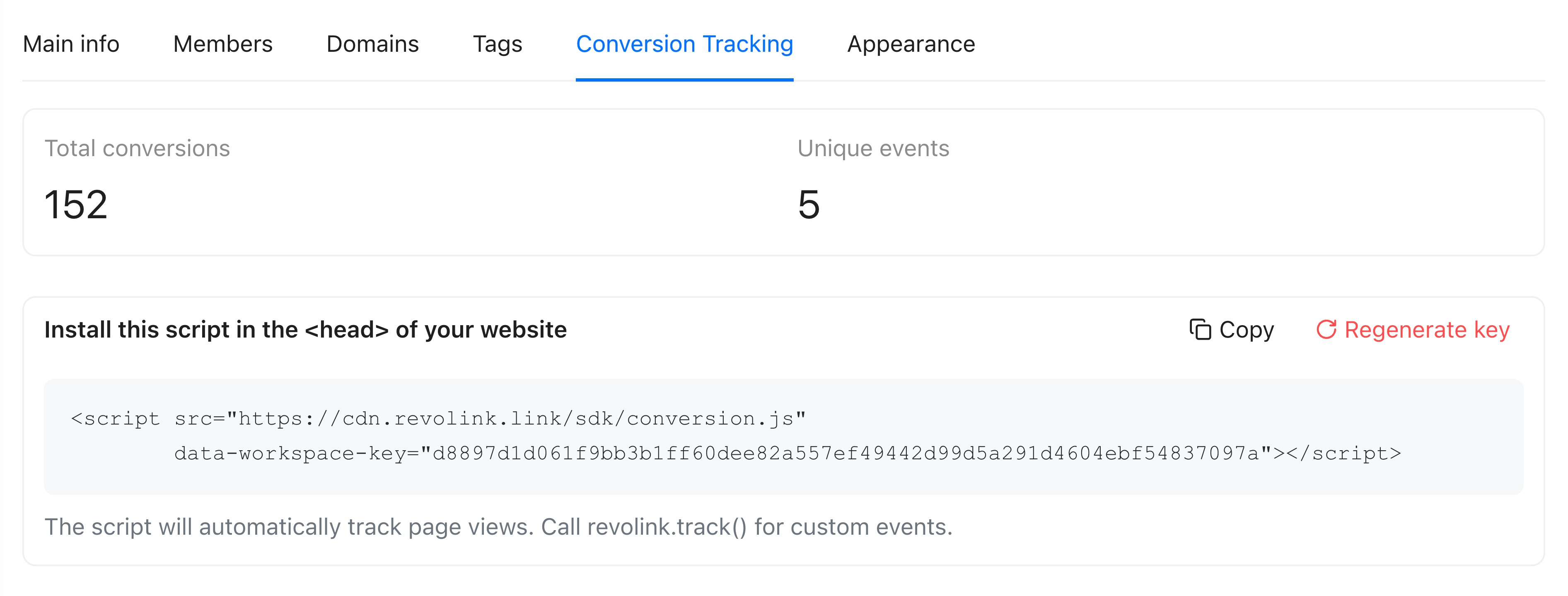
The Revolink conversion SDK is one snippet of JavaScript. You paste it into the <head> of your website. That's the full installation. From that point, you can start sending events without touching the code again.
For standard events, you can use HTML data attributes directly in your existing buttons and forms:
<button data-revolink-action="purchase" data-revolink-value="49" data-revolink-currency="USD">
  Complete Purchase
</button>
When a visitor who clicked your Revolink link presses that button, a purchase event is recorded automatically. No additional code, no custom event handlers.
For teams that need server-side tracking - to handle situations where browser-based tracking might be blocked by ad blockers or iOS privacy features - there's a server API endpoint that accepts events directly from your backend. Same data, more reliable delivery.
Who This Is For
Email marketers who want to know which campaigns actually drive revenue, not just opens and clicks.
Paid social teams running link-in-bio campaigns who need to prove ROI beyond reach and engagement.
Affiliate and influencer managers who want to give partners individual tracking links and see exactly which partnerships are converting - and at what value.
Product-led growth teams who share feature announcement links and want to know how many people who clicked actually activated the feature.
Anyone who has ever had to explain to a boss why 50,000 clicks didn't result in proportional sales.
The Bottom Line
Clicks are a leading indicator. Revenue is the lagging indicator that actually pays salaries. Conversion tracking is the bridge between the two.
You've already got the link infrastructure. The funnel data is one snippet away. Once it's in place, you'll have a hard time remembering how you made budget decisions without it.
Open your Revolink workspace, go to Settings → Conversion Tracking, generate your API key, and paste the snippet. The funnel starts building itself from the first click.
Related Topics:

Maksym Yaroshchuk
Founder & CEO at Revolink. Writes about link management, marketing automation, and growth strategies.