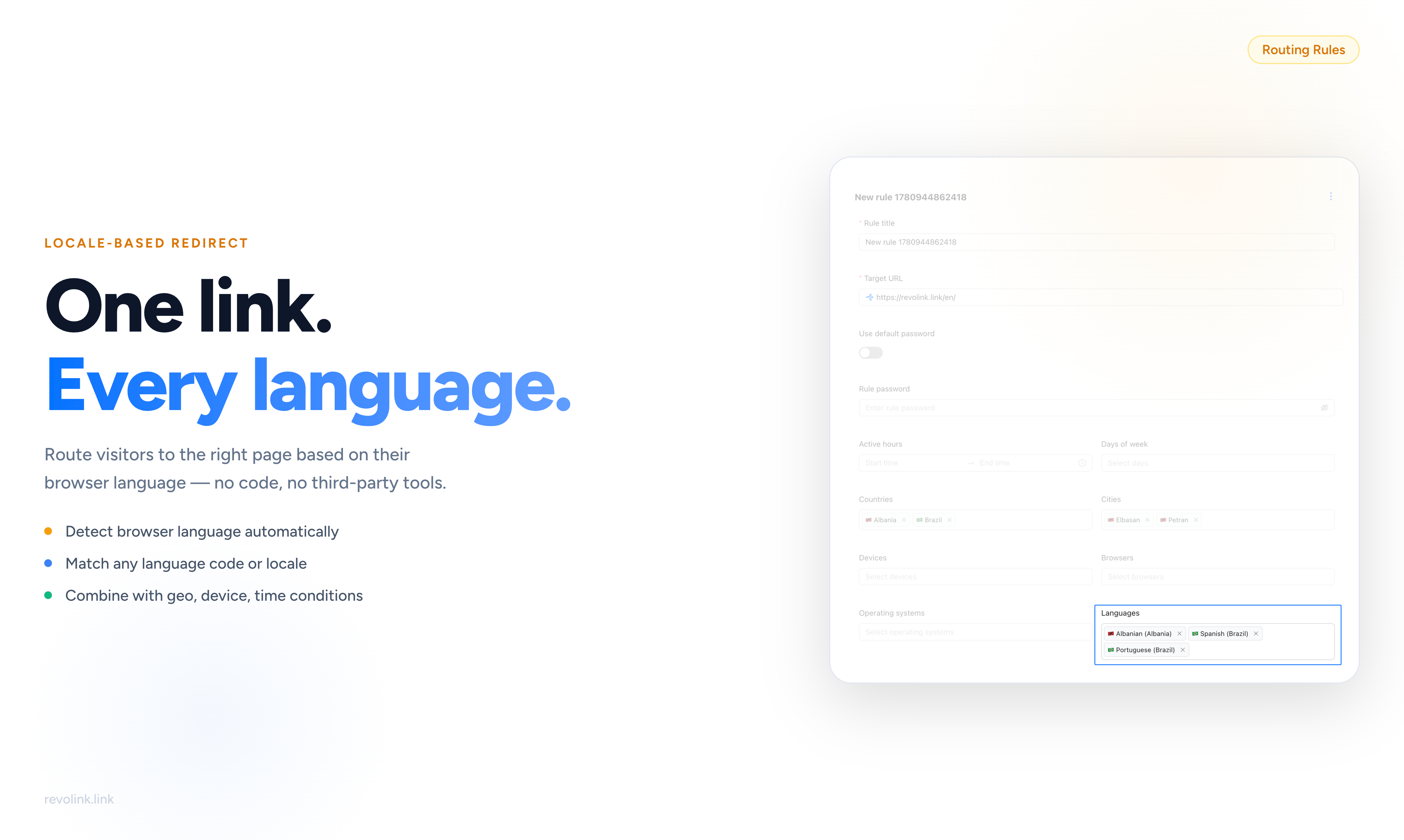
Stop Sending Everyone to the Same Page
You've done the hard work. You've translated your landing pages, localized your CTAs, adapted your messaging for each market. Your German page speaks to German buyers. Your French page converts French visitors. Your Brazilian Portuguese page hits the right tone for a Brazilian audience.
Then you share one link - and it sends every single visitor to the same destination.
German speakers land on English copy and bounce. French visitors read a headline that wasn't written for them. Brazilian users see pricing in the wrong currency. Everything you put into localization gets thrown away the moment they click.
The classic workaround is creating separate links for each language: one for the German audience, one for France, one for Brazil. But now you're managing three campaigns instead of one. Three separate QR codes to print, distribute, and track. Three URLs in your ad copy. Three analytics dashboards to reconcile when you want to understand how the campaign actually performed.
And when someone asks you for the results - you're the one pulling numbers from three different places and trying to make sense of them.
Language-based link routing solves this at the source. One link. Every language. Automatic, instant, invisible.
What Language-Based Routing Actually Does
Every browser carries a language preference. It's set in the user's operating system or browser settings - it reflects what language they actually use on their device, day to day. This preference travels with every web request the user makes, and it's one of the most reliable signals you have about who your visitor is.
When someone clicks your Revolink link, Revolink reads that language preference instantly - server-side, before the destination page even begins to load. It matches it against the language conditions you've configured in your rules, finds the first match, and redirects the visitor to the appropriate destination.
There's no pop-up asking users to choose a language. No "select your region" page. No JavaScript running in the browser. No visible redirect step. The visitor clicks, the detection happens in milliseconds, and they arrive on the right page - as if that's where the link always went.
If Revolink can't match the visitor's language to any of your rules, they land on your fallback URL. No one falls through to a 404. No one lands on a page that has nothing to do with your campaign.
Setting Up Language Conditions
Open any link in your Revolink dashboard and go to the Rules tab. Create a new rule. The rule editor gives you a full set of targeting options in one place: target URL, active hours, days of the week, countries, cities, devices, browsers, operating systems - and Languages.
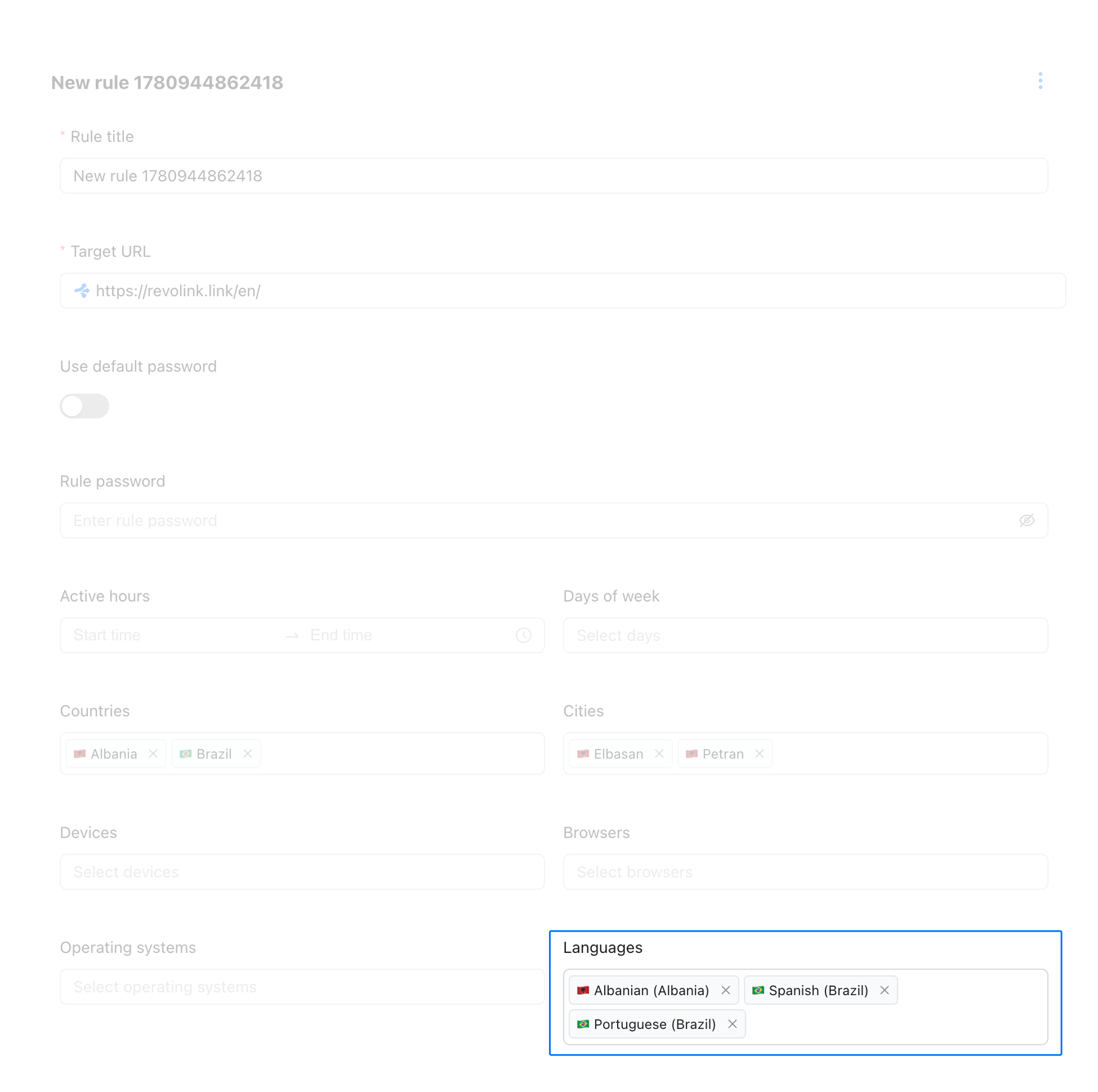
The Languages field is where you define which language audiences this rule serves. You can select one language or several - if any of the visitor's detected languages match your selection, the rule fires and they're routed to your target URL.
The list covers every major language and regional variant: English, German, French, Spanish, Portuguese, Japanese, Arabic, Ukrainian, Chinese, and hundreds more. Regional variants let you distinguish between, say, Brazilian Portuguese and European Portuguese, or between Simplified and Traditional Chinese - exactly the level of targeting your localization deserves.
Once you've set the language and the target URL, that rule is live. Every visitor whose browser matches that language will be automatically routed to your localized page. No developer involvement. No code change on your end.
Combining Language with Other Conditions
Language is one of many conditions Revolink supports. The real power comes from combining them. Every condition you add to a rule narrows the audience further - all conditions must match for the rule to fire.
The rule editor in the screenshot above shows exactly how this looks in practice: Countries set to Albania and Brazil, specific Cities selected, and Languages covering Albanian, Spanish (Brazil), and Portuguese (Brazil). That single rule targets a very precise audience: visitors from those specific countries and cities who speak one of those languages. Everyone else flows through to the next rule or the fallback.
Language + Country is one of the most common combinations. Consider German speakers: they live in Germany, Austria, Switzerland, and dozens of other countries - and they might need different landing pages for each market. Different pricing, different legal copy, different offers. A rule for Language = German + Country = Germany and a separate rule for Language = German + Country = Austria lets you handle that without creating multiple links. One link, two rules, two audiences, two perfectly matched destinations.
Language + Device lets you serve mobile and desktop audiences differently within the same language group. French mobile visitors might need a lighter page optimized for small screens. French desktop visitors get the full-featured version with all the detail. Same language condition, different device condition, different destination.
Language + Time opens up time-sensitive campaigns. A flash promotion for Spanish-speaking audiences this weekend only? Combine a Language = Spanish condition with specific days of the week and an active hours window. When the window closes, Spanish visitors fall through to your regular Spanish page. No manual toggling, no switching links.
Language + Browser or OS is useful when you're running app install campaigns. Send iOS users speaking Japanese to the App Store, Android users speaking Japanese to Google Play - from the same link.
Conditions within a single rule are evaluated with AND logic. Rules themselves are evaluated top to bottom - the first matching rule wins. Put your most specific rules at the top (the ones with the most conditions) so they fire before your broader catch-all rules below.
See Exactly Who's Clicking and in What Language
Once your language rules are live, the Languages section in your link analytics gives you a real-time breakdown of your audience by browser language.
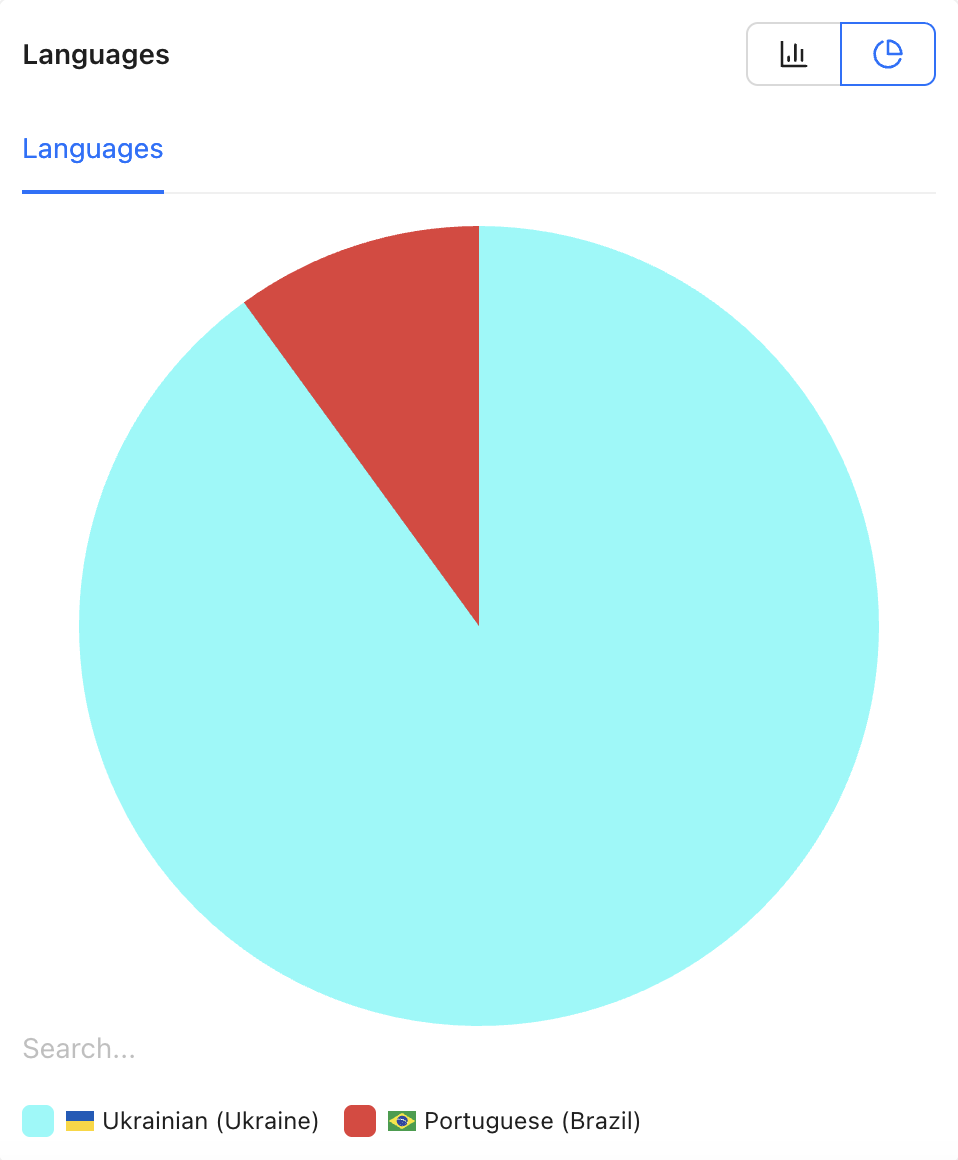
The pie chart gives you an immediate sense of proportion - which language dominates your audience and which segments are smaller. In this example, Ukrainian (Ukraine) accounts for the vast majority of traffic, with Portuguese (Brazil) as a secondary audience. That's information you can act on.
Switch to the bar chart view for exact numbers and percentages.
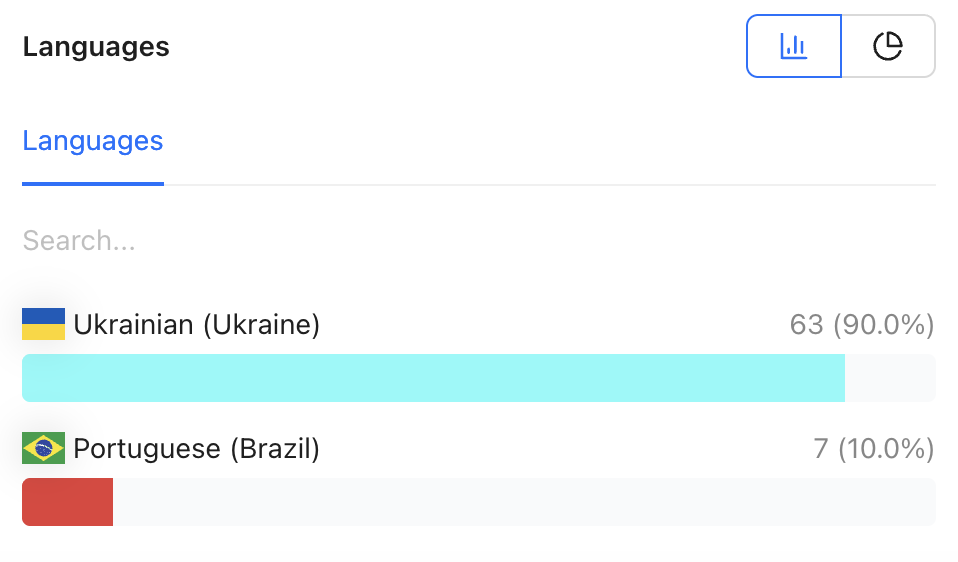
The bar chart shows click counts alongside percentages - 63 Ukrainian clicks (90%) and 7 Portuguese (Brazil) clicks (10%) in this case. This is the view to use when you're writing a campaign report and need specific numbers, not just proportions.
Both views are interactive: you can switch between them with a single click, and both update in real time as new clicks come in.
What the Language Analytics Tell You
The language breakdown is more than a vanity metric. It's a signal about where to invest next.
If a language segment you haven't targeted shows up with meaningful traffic, that's your market research. Visitors from that language group are already finding your link and clicking - they're interested. The only thing stopping them from converting is landing on a page that wasn't made for them. A localized landing page and a new language rule is now a justified investment.
If a segment you have targeted is underperforming, the problem isn't the link - it's what happens after the click. The language routing is working correctly; the landing page isn't converting. That's where to look: headline, offer, CTA, load speed, or mobile experience.
If one language dominates unexpectedly, it might mean your campaign distribution is skewed - the channel where you're sharing the link happens to have a different audience than you planned for. That's useful to know before you double down on that channel.
In every case, having language data attached to the same link as all your other click data means you can see the full picture without stitching together reports from separate links.
Who Gets the Most Value from Language Routing
Performance marketers running multilingual paid campaigns get a single link that handles every audience variant. One UTM parameter to track across languages instead of per-language UTM chaos.
Content and email marketers who send multilingual newsletters or maintain a global blog can link to the same URL everywhere and let the routing do the audience segmentation automatically.
Growth teams running international product launches don't need to coordinate separate link sets for each region's language. One campaign URL does the work for all of them.
Agencies managing campaigns for clients in multiple markets can use one smart link per campaign and deliver per-language performance reports from its unified analytics - instead of juggling separate links and dashboards for each locale.
E-commerce brands selling internationally can route visitors to country-specific stores with correct currency and pricing - combined with country conditions for precision, or language-only for broad reach.
The Fallback URL: As Important as Your Rules
Every smart link in Revolink has a fallback URL - the destination for visitors who don't match any of your rules. It's easy to overlook, but the fallback often handles your largest audience segment.
If English is your primary language and you haven't created an English language rule, every English-speaking visitor goes to the fallback. Make sure it's your English landing page.
If you're targeting three specific languages and leaving everything else to the fallback, pick a page that works for any audience: a product video, a visual overview, or a language-neutral demo. Avoid sending unmatched visitors to a homepage that has nothing to do with your campaign - that's the equivalent of a broken link for their intent.
A good fallback isn't an afterthought. It's the safety net that ensures 100% of your clicks lead somewhere intentional.
What Changes for Your Campaigns
Higher conversion rates from day one. Visitors who land in their own language convert better. Removing the language mismatch removes friction from the very first second of the experience - before they've read a word.
One link for every channel. One URL in your ad copy. One QR code on print materials. One link in your email signature, your bio, your press release. When the campaign performs well, there's no ambiguity about which link drove it - because there's only one link.
Cleaner, unified analytics. All language segments share the same link, so your click data is unified. No stitching together reports from five different URLs. No guesswork about whether your German link and your French link were measuring the same thing.
Smarter budget decisions. When you can see language-level performance data in one dashboard, you know exactly which language markets are driving ROI - and which ones need more investment in localization before they're worth scaling.
Zero engineering dependency. Language routing is configured entirely in the Revolink dashboard. No code change. No deployment. No sprint to wait for. You set it up, you launch it today, you own the results.
Frequently Asked Questions
Does language routing work with URL shorteners? Yes. Revolink combines URL shortening with smart routing in one platform. Your short link can have language-based routing rules applied - the shortened URL stays clean and shareable while the routing logic runs behind it.
What if a visitor's browser language isn't in my rules? They land on the fallback URL you define for that link. No one gets a broken page or a 404. You control exactly where unmatched visitors go.
Can I target multiple languages in a single rule? Yes. You can add several language variants to one rule. If any of them match the visitor's browser language, the rule fires and they go to that rule's target URL.
Does language routing slow down the redirect? No. Detection and routing happen server-side in milliseconds, before the destination page loads. The visitor experiences no delay compared to a standard redirect.
Can I combine language routing with A/B testing? Yes. You can set up language-specific rules and also run A/B variant testing on your links - the two features work independently and can be used on the same link.
What's the difference between language routing and geo (country) routing? Country routing redirects based on where the visitor is physically located - their IP-based geography. Language routing redirects based on the language configured in their browser - which often differs from their physical location. A German-speaking expat in Brazil has a Brazilian IP but a German browser language. With language routing, you can serve them the German page regardless of where they're browsing from. Combining both gives you the most precise targeting.
Do I need a developer to set up language routing? No. Everything is configured in the Revolink dashboard through a point-and-click rule editor. No code, no API calls, no technical setup required.
Related Topics:

Maksym Yaroshchuk
Founder & CEO at Revolink. Writes about link management, marketing automation, and growth strategies.