Slack Integration
Get Your Link Analytics Right Inside Slack
No dashboard tab to open. Get Revolink data and automations delivered straight into the channel your team already lives in.
Last updated: July 2026
Two ways to connect
Pick the one that matches your team's setup.
Claude in Slack
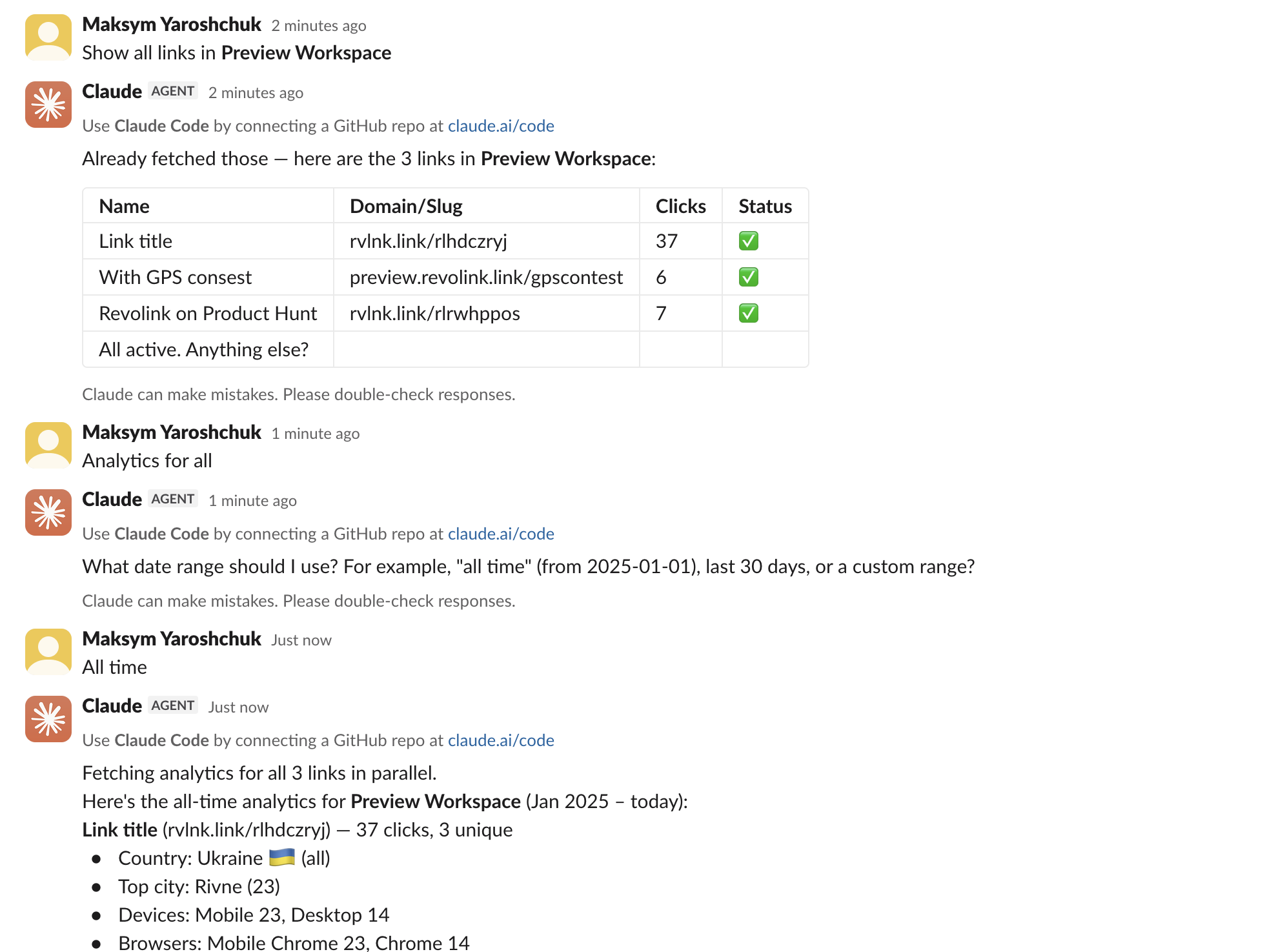
If your team uses Claude in Slack with the Revolink connector already added in Claude's settings, just tag @Claude in any channel and ask about your links - "how many clicks did our launch link get this week?" - and the answer appears right in the thread. No dashboard, no exporting.
You'll need:
- A paid Claude plan (Pro, Max, Team, or Enterprise) with the Slack app installed
- The Revolink connector added in Claude's own settings beforehand by a workspace admin
New connectors can only be added from Claude's settings, not from inside Slack itself - so this is a one-time setup step before your team can use it in-channel. Also note: Claude in Slack is being renamed "Claude Tag" (same feature, new name) - don't worry if you see either name.
Via Zapier
No Claude Team or Enterprise plan? Build a Zap instead: a Slack trigger - a slash command or a new message - calls a Revolink action through Zapier's MCP Client connector, and the result posts back to the channel automatically.
You'll need:
- A Zapier account with the MCP Client connector (beta) connected to Revolink
- No Claude subscription required
What you can do in Slack
Real scenarios marketing teams set up in minutes.
Daily click digest
Every morning, your team's Slack channel gets a summary of yesterday's clicks across your top links.
Click-limit alerts
The moment a link crosses a click threshold you set, Slack pings the channel automatically.
Create a short link without leaving Slack
Paste a long URL into a Slack command, and get a branded Revolink short link back in seconds.
2
Ways to connect
8
Revolink actions available
Beta
Zapier MCP Client status
~5 min
Setup time
Frequently asked questions
What's the difference between the two methods?
Claude in Slack lets you ask questions in natural language and get answers right in a thread - great for quick lookups. Zapier is better for scheduled or triggered automations, like a daily digest or an alert, that run without anyone asking.
What do I need for each method?
Claude in Slack needs a paid Claude plan with the Slack app installed and the Revolink connector pre-added by an admin. Zapier needs a Zapier account with the MCP Client connector (beta) connected to Revolink - no Claude subscription required.
Is our Slack data safe?
Revolink only receives what you explicitly ask it for through the connector - it doesn't read your Slack messages. Access can be revoked anytime from Revolink → Profile → Connected Apps.
Can we use both methods at the same time?
Yes - many teams use Claude in Slack for ad-hoc questions and a Zapier automation for scheduled reports, side by side.
Route Smarter. Convert More.
Stop sending everyone to the same page. Route by location, device, and time - start free, no credit card required.
Start for Free - No Card RequiredFree forever · No credit card · Cancel anytime